
AI dictation startup Wispr Flow has officially launched its Android app, expanding beyond its earlier releases on Mac, Windows, and iOS. The move marks a major step for the company as it pushes its voice-first input system into the Android ecosystem.
Unlike iOS, where Wispr Flow works through a custom keyboard, the Android version introduces a different interaction model built around a floating on-screen bubble.
A new dictation experience designed for Android
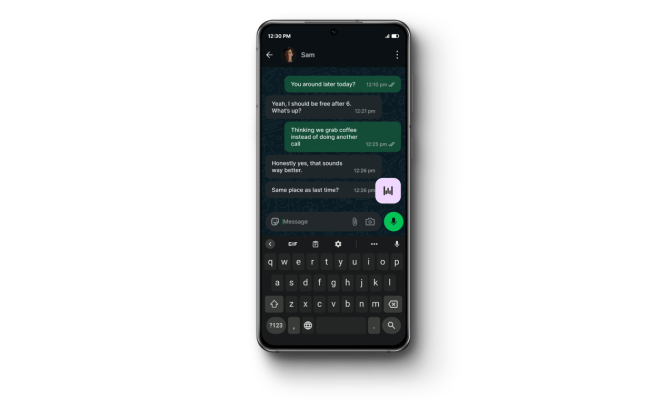
On Android, Wispr Flow avoids the keyboard approach and instead uses a persistent floating control that stays on top of other apps. This allows users to dictate text anywhere without switching input methods.
The basic workflow is simple:
- Tap or hold the floating bubble to start dictation
- Speak naturally while the app transcribes in real time
- Tap again or press a stop button to end input
Once finished, the app automatically inserts the text into whatever app you’re using.
This design is intended to make voice input feel more like a system-level tool rather than a standalone app.
Smart cleanup and context-aware formatting
Wispr Flow isn’t just transcribing speech—it also tries to refine it.
The app includes:
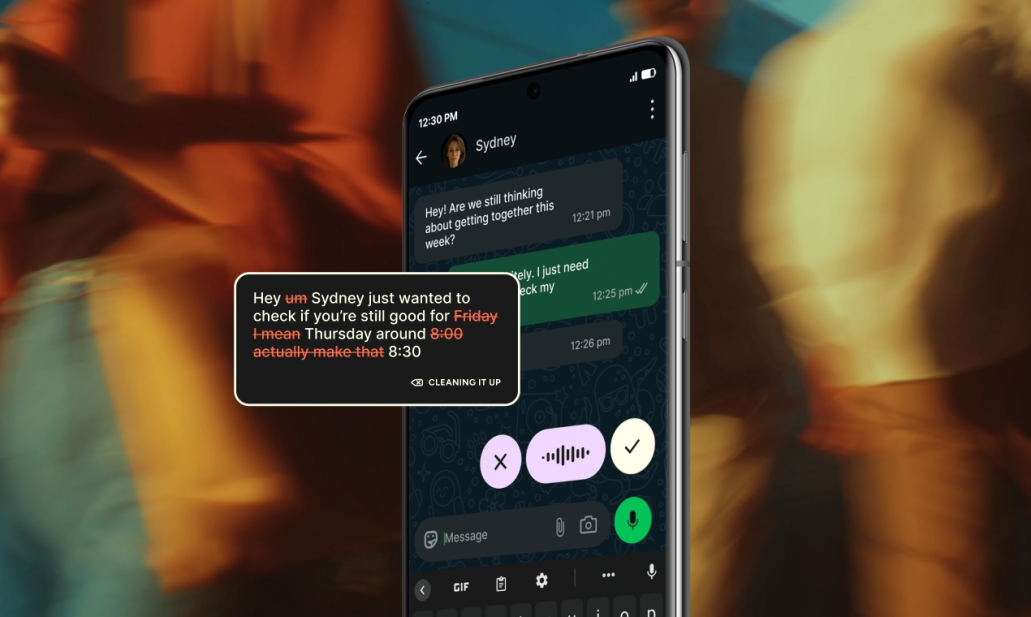
- Automatic removal of filler words like “um” and “you know”
- Context-aware formatting depending on the app you’re using
- Punctuation and structure adjustments for readability
- Improved sentence flow compared to raw speech-to-text
This makes it more useful for writing emails, messages, notes, or longer-form content where clean output matters.
Multi-language support and Hinglish model
One of the standout features is broad language coverage. Wispr Flow supports 100+ languages, and it also introduces a specialized model for Hinglish (a mix of Hindi and English commonly used in India).
Instead of forcing users to switch between formal language modes, the system is designed to understand natural code-switching in conversation, which is a major usability improvement for multilingual speakers.
Performance improvements and infrastructure rewrite
Alongside the Android launch, the company says it has rebuilt parts of its backend infrastructure, claiming:
- Around 30% faster dictation performance
- Improved responsiveness during live speech-to-text conversion
- Better stability across apps and devices
This matters because real-time dictation tools depend heavily on latency. Even small delays can make voice input feel unnatural.
Early adoption and traction
Even in early rollout, Wispr Flow reports strong usage numbers, with users collectively speaking over 1.3 million words in English in just a short period.
The company is part of a growing wave of AI dictation tools, competing with newer entrants like Typeless, which also recently launched on Android.
Backed by strong investor interest
Wispr Flow has also attracted significant venture capital attention:
- Total funding: $81 million
- Latest valuation reportedly around $700 million
- Recent rounds led by major investors including Menlo Ventures and Notable Capital
This level of funding reflects growing confidence in voice-first interfaces as a potential alternative to traditional typing.
Why this Android launch matters
Android is a particularly important platform for this kind of tool because it allows deeper system-level overlays and flexible input methods. That’s exactly what Wispr Flow is leveraging with its floating bubble design.
The company’s argument is straightforward: if voice input is going to replace typing in some contexts, it needs to be:
- Always available
- Cross-app
- Fast enough to feel natural
- Clean enough to replace manual editing
Wispr Flow’s Android release isn’t just another app port—it’s a shift in interface design. By moving away from keyboard-based dictation and toward a floating, system-wide voice layer, the company is betting that voice input can become a default way of interacting with apps, not just an accessibility feature or shortcut.
Whether it becomes mainstream will depend less on the idea itself—and more on whether it feels faster and more reliable than typing in everyday use.